Convert JPG to PNG Online Free - Also WEBP and PDF, No Upload
Convert JPG to PNG, PNG to JPG, or any image to WEBP or PDF online for free. Set quality and file size. Runs in your browser: nothing is uploaded.

A website wants a JPG, your designer sent a PNG, a form only accepts files under 200 KB. With Go Pixer you can convert JPG to PNG online - or PNG to JPG, any picture to WEBP or PDF - in a few clicks. The conversion happens in your browser, so the file never leaves your computer and you do not need an account.
How to convert an image in 3 steps
- Click Open the Image converter in Go Pixer above, then open your picture (or drag it onto the page). JPG, PNG, WEBP, GIF and the other images your browser can open work, as do Photoshop PSD and SVG files.
- The Export menu opens at the top right. Under Export format, choose JPG, PNG, WEBP or PDF.
- Set the quality or size if you like, then click Download image.
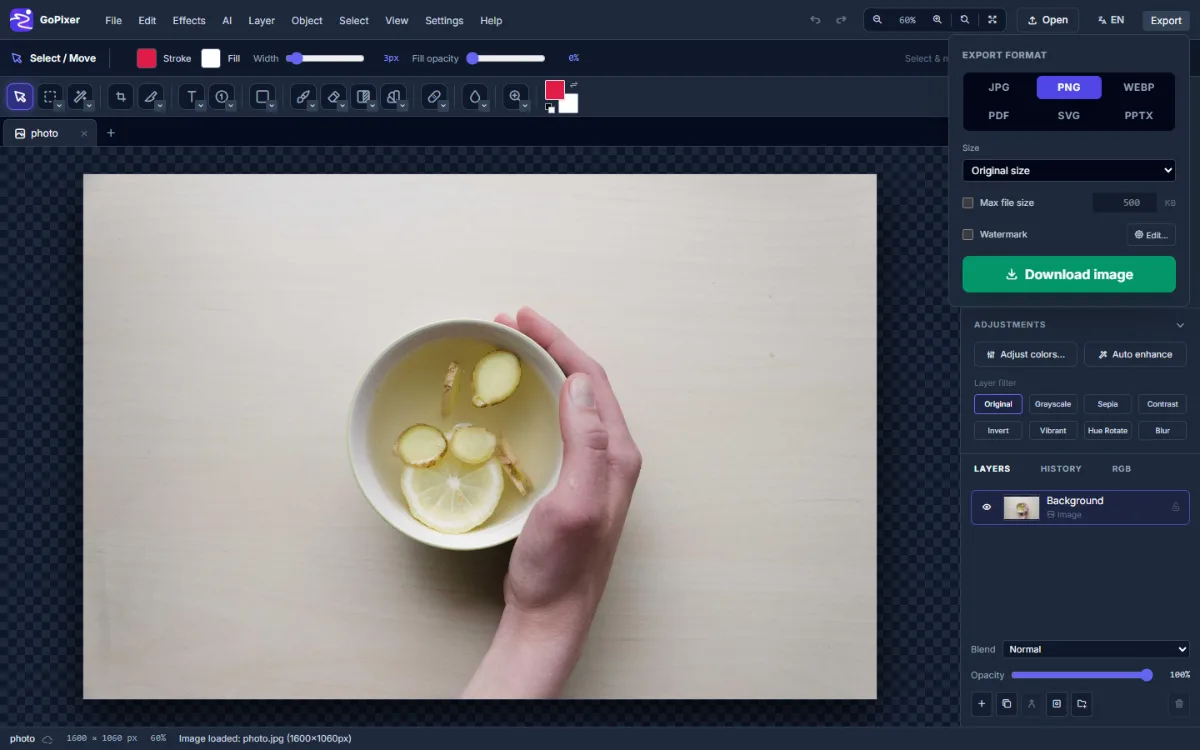
Which format should you choose?
- JPG: the smallest files for photos. It has no transparency: if your picture has see-through areas, Go Pixer asks whether to fill them with white or switch to PNG.
- PNG: lossless, keeps transparency. Best for logos, screenshots and cut-outs - for example after you remove a background.
- WEBP: much smaller than PNG and keeps transparency. Good for websites.
- PDF: the picture as a PDF page, handy for forms that ask for a PDF.
Control the quality and file size
- For JPG and WEBP, the Quality slider goes from 10% to 100%. 80–90% is hard to tell from the original and much lighter.
- Turn on Max file size and type a limit in KB: Go Pixer finds the best quality that fits, and makes the picture smaller only if even a low quality is too heavy.
- Under Size, keep Original size or pick a preset (Instagram post, Story, YouTube thumbnail…) or a custom size. To change the size first, see how to resize an image.
- Many files? File › Batch process… converts a whole set to JPG, PNG or WEBP and downloads one ZIP.
Why convert in your browser?
Most online converters upload your file, convert it on their server and send it back. Go Pixer does the work on your own device: it is quick, it works for private documents, and there is no watermark. The free plan exports up to 4096 px on the longest side.
Frequently asked questions
Is the image converter free?
Yes, free to start: open a picture, choose the format under Export and download it, without signing up and without a watermark. The free plan exports up to 4096 px on the longest side.
Is my file uploaded to a server?
No. The picture is opened and converted in your browser, on your own computer or phone.
Why did my transparent background turn white?
JPG cannot store transparency. Go Pixer offers to switch to PNG; choose PNG or WEBP to keep the see-through areas.
How do I make the file smaller?
Choose JPG or WEBP and lower the Quality, or turn on Max file size and type the limit in KB. WEBP is usually the lightest.
Can I convert many images at once?
Yes, with File › Batch process…: choose JPG, PNG or WEBP (or keep each picture's format). The number of pictures per batch depends on your plan.
Try it now - free
Nothing to install, no sign-up needed. Your photos stay on your computer.
Open the Image converter in Go PixerMore free guides

Go Pixer vs Photoshop - What a Free Browser Editor Can Do (and What It Can't)
An honest comparison: layers and PSD, Object Selection, Content-Aware Move, Highlights / Shadows / Clarity / Dehaze, lens correction, Perspective Crop, RAW files and AI in a free browser editor.

Remove Background Online Free - No Upload, No Sign-Up
Remove the background of any photo for free, right in your browser. The AI runs on your computer: your photo is never uploaded. Download a transparent PNG.
Crop Image Online - Free, Fast, Square or 16:9
Crop an image online for free: square for Instagram, 16:9 for YouTube, or any size you like. Works in your browser, your photo is never uploaded.

Resize Image Online Free - Exact Pixels, Smaller Files
Resize an image online for free: set the width or height in pixels, keep the aspect ratio, and export a smaller JPG, PNG or WEBP. No upload, no sign-up.