PSD Editor Online Free - Open and Edit Photoshop Files
Open and edit PSD files online for free, without Photoshop: layers, masks and blend modes are kept. Save back to PSD. In your browser, no upload.

Someone sent you a .psd file and you do not have Photoshop? Or you just need to change a word or hide a layer? Go Pixer is a free online PSD editor: open the file in your browser, see its layers, make your changes and save it again - as PSD, PNG, JPG or PDF.
How to edit a PSD file in 3 steps
- Click Open the PSD editor in Go Pixer above, then choose your .psd file (or drag it onto the page). Later: File › Open image….
- The layers appear in the Layers panel: show or hide them with the eye, change opacity and blend mode, double-click a text to change its words, move, paint or add new layers.
- Save with File › Download as PSD to keep the layers, or Export a flat PNG, JPG, WEBP or PDF.
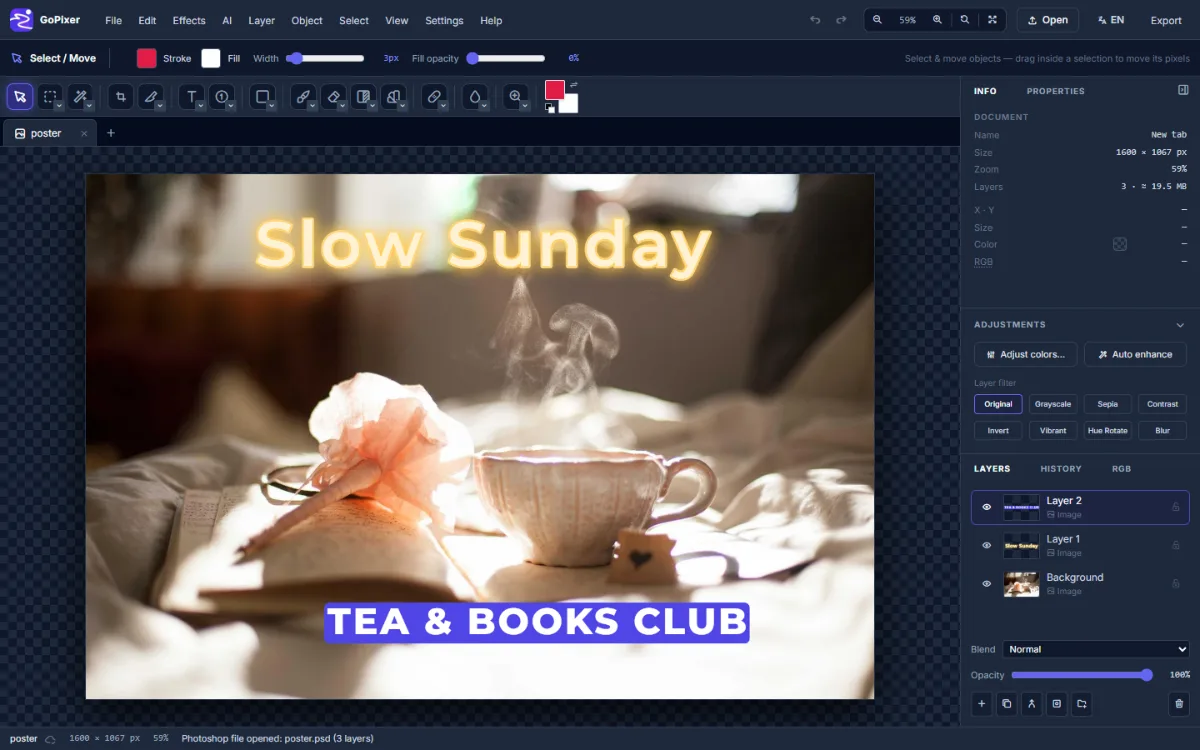
The poster above was saved as a PSD with three layers - the photo and two titles - and opened again: every layer is still separate.
What is kept, what is not
- Opening: layers in place, groups, masks, blend modes, clipping, layer styles, some adjustment layers - and text layers stay editable, so you can retype the words. Go Pixer tells you if a part could not be kept.
- Saving as PSD: layers, clipping, layer styles and adjustment layers are written; text is saved as an image layer (not retypeable in Photoshop yet).
- Very large PSB files and colors other than RGB (such as CMYK) are not supported.
- Want to add more words? Use the Text tool.
Why an online PSD editor?
No install, no subscription, and it works on any computer with a modern browser. The file is opened on your device - it is not uploaded - which matters for client and company files.
Frequently asked questions
Can I open PSD files without Photoshop?
Yes. Go Pixer opens .psd files in the browser and shows their layers, for free.
Can I save my changes as PSD?
Yes, File › Download as PSD writes a Photoshop file with your layers.
Can I edit the text in a PSD?
Yes: text layers of a Photoshop file open as editable text, so you can retype the words. When you save back to PSD, the text is written as an image layer.
Is my PSD uploaded?
No, it is opened and edited in your browser on your own device.
Try it now - free
Nothing to install, no sign-up needed. Your photos stay on your computer.
Open the PSD editor in Go PixerMore free guides
Go Pixer vs Photoshop - What a Free Browser Editor Can Do (and What It Can't)
An honest comparison: layers and PSD, Object Selection, Content-Aware Move, Highlights / Shadows / Clarity / Dehaze, lens correction, Perspective Crop, RAW files and AI in a free browser editor.
Remove Background Online Free - No Upload, No Sign-Up
Remove the background of any photo for free, right in your browser. The AI runs on your computer: your photo is never uploaded. Download a transparent PNG.
Crop Image Online - Free, Fast, Square or 16:9
Crop an image online for free: square for Instagram, 16:9 for YouTube, or any size you like. Works in your browser, your photo is never uploaded.
Resize Image Online Free - Exact Pixels, Smaller Files
Resize an image online for free: set the width or height in pixels, keep the aspect ratio, and export a smaller JPG, PNG or WEBP. No upload, no sign-up.